How to add notes to Notion fast, without opening the app
The fastest ways to add a note to Notion from your phone in 2026: Lock Screen widget, tags, offline queue, and what the official app can and cannot do.
Read →Open, type, saved. Instant Note writes straight into the Notion database you choose, with your tags, even without a connection. Lock Screen and Home Screen widgets skip the loading screens of the official app.


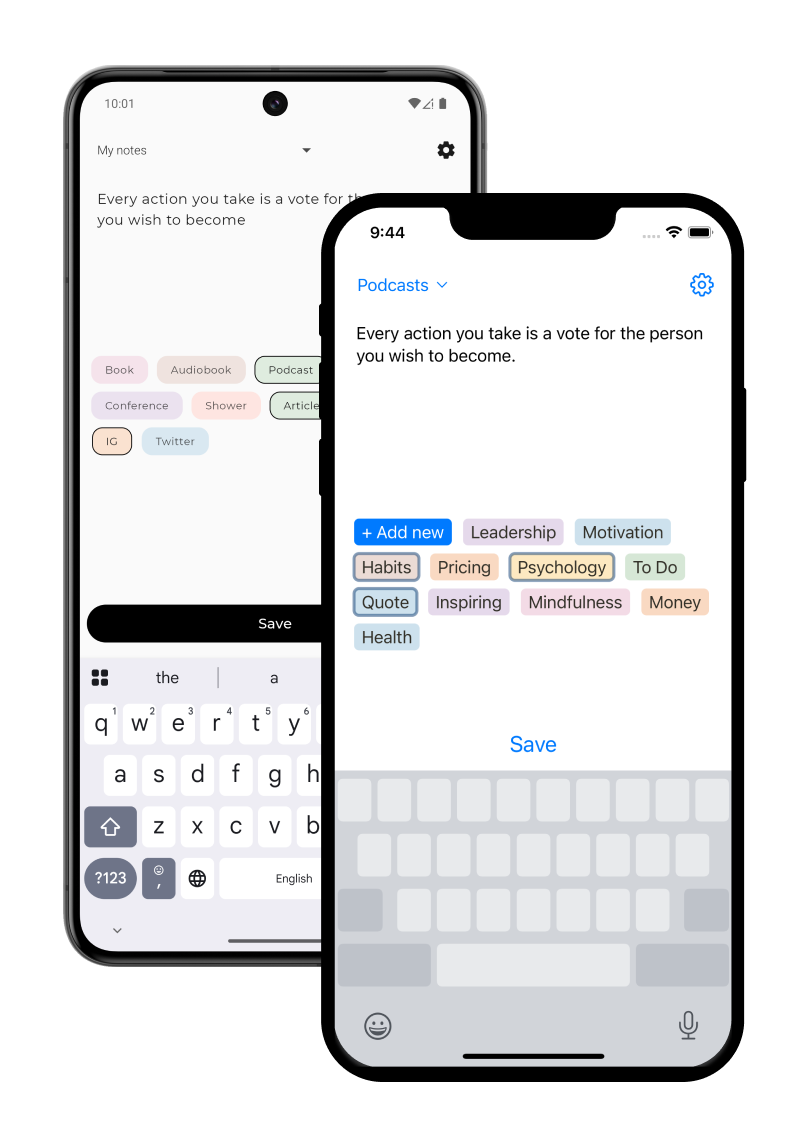
The app opens on the text field. No workspace to load, no page to find. A note with tags takes a few seconds.
Start a note from the Lock Screen or the Home Screen. Pro widgets carry your tags, so the note is already sorted when you open it.
Select and multi-select properties from your Notion database appear as tags in the app. Pick them while you type; the row lands in the right place.
I am really amazed by how lightweight yet really minimalistic,elegant and fastthis app is! This is a must-have for anyone doing Quick Capture for tasks/ideas in Notion!
App Store Review
Awesome little app thatdoes exactly what it says
App Store Review
The first app you should install if you use Notion. I use this quick capture app over 50 times every day. The best part - you can do this all from your locked screen as well!
App Store Review
I have been using fast notion, but switched to this one because it has a simpler UI, is more beautiful, has no ads, and allows me to leave notes in the database for free
App Store Review
Instant Notion is an iOS app allowing you to quickly save notes to Notion. The official Notion app is not optimised for quick capture and takes time to open a specific database. With Instant Notion you can reduce the time it takes to save a note to seconds.
If you need a way of quickly saving a tagged note to Notion, you'll love Instant Notion. On top of it you'll be able to save notes offline, add your own tags from Notion and configure widgets (Lock Screen and Home Screen).
No, Instant Notion is a 3rd party app developed on top of Notion's official API.
Yes! Everyone can add a Lock Screen widget and Pro users can add Home Screen widgets.
We take your privacy extremely seriously - your notes stay on your phone and Notion, we do not access them. We use the official authorization and data access way provided by Notion.
Most of the features are free (configuring multiple databases, tagging notes, lock screen widget). A few features are available in the Pro tier: home screen widgets and the ability to create new tags without opening Notion.
The fastest ways to add a note to Notion from your phone in 2026: Lock Screen widget, tags, offline queue, and what the official app can and cannot do.
Read →A plain method for taking notes fast: write the thought down in seconds, tag it once, and sort the pile once a week. With Notion and Instant Note.
Read →Set up an expense database in Notion and log the amount, category and a receipt photo from your phone in a few taps with Fast Actions for Notion.
Read →Track habits in a Notion database and check them off from your phone with a Fast Actions form. What works today, what is missing, what we are considering.
Read →Set up one Inbox database in Notion, capture into it from your phone in seconds, and process it once a week. GTD without the friction of the mobile app.
Read →A simple daily journal database in Notion with mood, tags and a note, plus a Fast Actions form that makes the evening entry a two-minute job on your phone.
Read →Capture decisions and action items into Notion in the minute after a meeting ends, from your phone. A one-line note with tags, or a short structured form.
Read →Get a photo from your iPhone camera straight into a Files property of a Notion database: receipts, whiteboards, labels, shelves. Setup, steps, one limit.
Read →What Notion's offline mode on mobile does and does not do in 2026, and how to write notes into a Notion database from a plane or the subway with no signal.
Read →How to get a thought into a Notion database from the iPhone Lock Screen in a few seconds, with tags, before it is gone. Set-up steps and the limits.
Read →A reading log in Notion with title, author, status, rating and takeaways, logged from your phone the moment you finish the book, using Fast Actions.
Read →Two ways to save a link from Safari to Notion on iPhone: Notion's own Share Sheet clipper or Instant Note's share extension, and when to use which.
Read →How to get a spoken note into a Notion database from your phone today using keyboard dictation, what Notion's own voice features do, and what is missing.
Read →Which Notion widgets exist on iOS, why none of them captures a note, and how to add a Lock Screen or Home Screen widget that opens into a database row.
Read →How to put a widget on your Android home screen that opens straight into a new note for a Notion database, what the official Notion widgets do, and limits.
Read →Log exercise, weight, sets and reps into a Notion database from your phone between sets. The database setup, Fast Actions defaults, and one honest limit.
Read →What Siri can and cannot do with Notion in 2026, the Shortcuts workaround that creates a database page by voice, and the Siri capture being considered.
Read →